
NexysCloud
Complete Cloud Communications for Growing South African Businesses
🛠️ Managed Communication Services
Your Entire Business Communication Infrastructure — Fully Managed, So You Don't Have To
Running a business is hard enough without worrying about phone systems, connectivity, call routing, software updates, and security patches. NexysCloud's Managed Communication Services takes complete ownership of your communication infrastructure — from setup to support, monitoring to maintenance — giving you enterprise-grade communications without the enterprise-grade complexity.
Is Managing Your Own Communications Costing More Than You Think?
If any of these resonate, it's time to hand it over to the experts:
❌ Your IT team spends too much time troubleshooting phone and communication issues
❌ No dedicated resource to manage, monitor, and maintain your communication systems
❌ Unexpected downtime and outages causing lost revenue and frustrated customers
❌ Security vulnerabilities from unpatched, outdated communication software
❌ Multiple vendors, multiple invoices, and no single point of accountability
❌ Paying for features and capacity you don't need — or not having what you do need
❌ No proactive monitoring — you only find out something is broken when customers call to complain
❌ Struggling to keep up with software updates, new features, and evolving compliance requirements

What Are Managed Communication Services?
Managed Communication Services (MCS) is a fully outsourced model where NexysCloud takes complete responsibility for your business communication infrastructure — including Cloud PBX, SIP Trunking, UCaaS, connectivity, video conferencing, and call centre solutions.
We handle the setup, configuration, monitoring, maintenance, updates, security, and ongoing optimisation — all under a single monthly fee with a guaranteed SLA.
Think of it as having a dedicated, expert communications team — without the cost of hiring one.
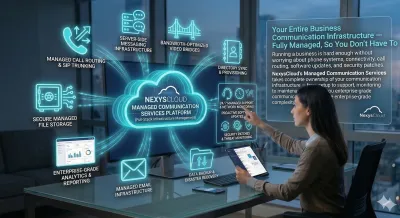
The NexysCloud Managed Services Advantage
✅ Single Point of Accountability — One provider for all your communication services
✅ Proactive Monitoring — We identify and fix issues before you even notice them
✅ Guaranteed SLA — Uptime, response time, and resolution time commitments
✅ Predictable Monthly Costs — No surprise bills or emergency repair fees
✅ Always Up to Date — Automatic software updates, patches, and new features
✅ Enterprise Security — Proactive threat detection, encryption, and compliance
✅ Scales With Your Business — Add services, users, or locations in days
✅ Free Your IT Team — Let your internal team focus on core business priorities
✅ 35+ Years Expertise — Deep telecommunications knowledge at your service
✅ Local SA Support — Real people, fast response, based in South Africa
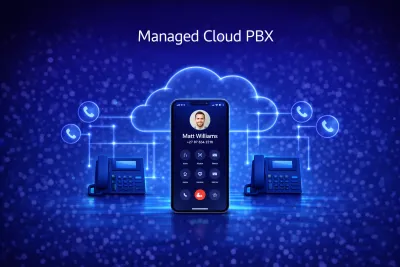
What We Manage For You
☁️ Managed Cloud PBX
Your complete business phone system — monitored, maintained, and optimised 24/7.
Full setup and configuration of extensions, routing, and IVR
Proactive monitoring of call quality and system performance
Automatic software updates and feature releases
Add/remove users, extensions, and features on request
Call recording management and secure storage
Regular reporting on system health and usage
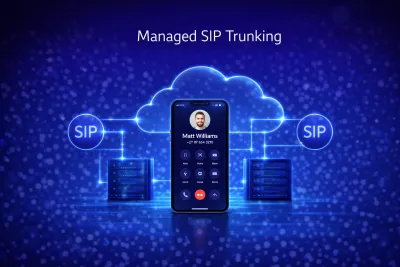
📡 Managed SIP Trunking
Your PSTN connectivity — fully managed for reliability and cost efficiency.
Trunk provisioning, configuration, and ongoing management
Real-time fraud monitoring and prevention
Call quality monitoring and optimisation
DID number management — additions, removals, and porting
Monthly call spend reporting and cost analysis
Failover configuration and testing
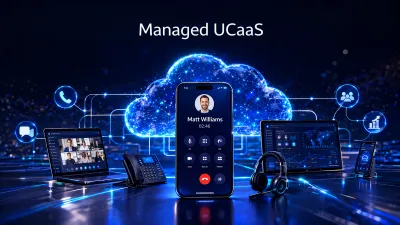
🔗 Managed UCaaS
Your unified communications platform — deployed, optimised, and supported end-to-end.
Platform deployment and user provisioning
CRM and business application integrations
Ongoing user management — onboarding and offboarding
Feature configuration and workflow optimisation
AI and automation setup — transcriptions, summaries, routing
Training for new and existing staff
🌐 Managed Connectivity
Your internet connection — monitored around the clock for performance and reliability.
24/7 connection monitoring and alerting
Proactive failover management during load shedding
Bandwidth optimisation — prioritise VoIP and business-critical traffic
Router and network equipment management
Monthly performance and usage reports
Escalation management with connectivity providers
📞 Managed Call Centre
Your call centre platform — fully managed so your agents can focus on customers.
Agent provisioning, configuration, and management
IVR design and ongoing optimisation
Real-time and historical reporting
Call recording compliance and quality monitoring
CRM integration management
Omnichannel configuration — voice, chat, email, and WhatsApp
🎥 Managed Video Conferencing
Your Yealink Teams Rooms estate — professionally managed from end to end.
Device provisioning and Microsoft Teams integration
Remote monitoring of all meeting room devices
Firmware updates and security patches
Room scheduling and calendar integration management
Fault detection and rapid replacement coordination
User training and adoption support
🔒 Managed Security & Compliance
Protecting your communications infrastructure — proactively.
Real-time threat monitoring and fraud detection
Encrypted communications management
POPIA-compliant call recording and data handling
Regular security audits and vulnerability assessments
Role-based access control management
Incident response and breach management
How It Works
Step 1: Communication Audit
We conduct a thorough audit of your current communication infrastructure — identifying gaps, inefficiencies, security risks, and cost savings opportunities — completely free.
Step 2: Managed Services Plan Design
We design a tailored Managed Communication Services plan — covering exactly the services you need, at the right SLA level for your business.
Step 3: Seamless Onboarding
We take over management of your existing systems or deploy new ones — with zero disruption to your business operations. Most onboardings are completed within 5–10 business days.
Step 4: Proactive Monitoring & Management
From day one, NexysCloud proactively monitors your entire communication stack — identifying and resolving issues before they impact your business.
Step 5: Regular Reviews & Optimisation
We conduct monthly reporting reviews and quarterly optimisation sessions — ensuring your communication infrastructure evolves with your business needs.
Service Level Agreements (SLAs)
Every NexysCloud Managed Services client gets a guaranteed SLA
SLA Metric
System Uptime
First Response Time
Resolution Time
Proactive Monitoring
Monthly Reporting
Quarterly Reviews
Dedicated Account Manager
Standard
99%
4 hours
24 hours
Business hours
✅
❌
❌
Business
99.5%
2 hours
8 hours
Extended hours
✅
❌
Premium
99.9%
30 minutes
4 hours
24/7
✅
✅
✅
Managed vs. Self-Managed Communications
Aspect
Monitoring
Updates
IT burden
Cost predictability
Expertise
Security
Scalability
Accountability
Compliance
Response to issues
Self-Managed
Reactive — after problems occur
Manual, often delayed
High — internal resources consumed
Unpredictable — surprise repair bills
Limited to internal skills
Often overlooked
Slow — requires planning and resources
Fragmented across multiple vendors
DIY risk
When IT gets to it
NexysCloud Managed
Proactive 24/7 monitoring
Automatic, always current
Eliminated — fully outsourced
Fixed monthly fee
35+ years telecoms expertise
Proactive, always current
Fast — done for you in days
Single point of contact
Managed and assured
SLA-guaranteed response times
Who Is This For?
🏢 Business owners who want communication systems that just work — without technical headaches
🧑💼 SMEs without a dedicated IT team needing expert communication management
🏥 Healthcare & financial services with strict compliance and security requirements
📞 Call centres needing platform reliability and performance guarantees
🏗️ Multi-location businesses requiring consistent communication across all branches
📈 Fast-growing businesses needing a communication partner that scales with them
🔄 Businesses migrating from legacy systems needing guided, risk-free transition
🌍 Businesses with remote or hybrid teams needing centralised communication management
Frequently Asked Questions
What is the difference between Managed Communication Services and just buying a phone system?
When you buy a phone system, you own the responsibility for managing, maintaining, securing, and updating it. With NexysCloud Managed Communication Services, we take complete ownership of that responsibility — monitoring, maintaining, updating, and optimising everything for you, under a guaranteed SLA.
Can you manage our existing systems or only NexysCloud products?
We can manage most major communication platforms — including 3CX, Microsoft Teams, existing Cloud PBX systems, and more. We'll assess your current setup during the free audit and advise on the best approach.
What if something goes wrong?
Our proactive monitoring means we typically identify and resolve issues before you even notice them. If an incident does occur, our SLA guarantees response and resolution times — and your dedicated support team is always reachable via phone, email, or ticket.
Will we need our own IT team?
No. One of the biggest benefits of Managed Communication Services is freeing your internal team from communication management entirely. We handle everything — you focus on running your business.
Can we add services as our business grows?
Absolutely. Our Managed Services plans are fully modular — add Cloud PBX, call centre, connectivity, or video conferencing management as your business needs evolve.
How is billing handled?
All managed services are billed on a single monthly invoice — one line item covering all your communication infrastructure. No surprise charges, no multiple vendor invoices.
Is there a minimum contract period?
We offer both month-to-month and fixed-term managed services agreements. Fixed-term contracts offer better pricing. We'll recommend the right option for your business during the consultation.
How do you handle POPIA compliance?
NexysCloud manages call recording, data storage, and communication logs in full compliance with South Africa's POPIA legislation. We advise on best practices and ensure your communication infrastructure meets all regulatory requirements.
Ready to Transform Your Business Communications with NexysCloud?
Schedule a free consultation to discuss your communications needs and discover how we can help your business thrive.

Enterprise Power.
Small Business Price.
That's the NexysCloud Difference.


Copyright 2026. NexysCloud. All rights reserved.