
NexysCloud
Complete Cloud Communications for Growing South African Businesses
🎥 Video Conferencing Solutions
Transform Every Meeting Room Into a Microsoft Teams-Powered Collaboration Space
Whether your team is in the boardroom, a remote branch, or working from home — NexysCloud delivers professional, Microsoft Teams-certified video conferencing solutions powered by Yealink Teams Rooms. Crystal-clear video, immersive audio, and effortless collaboration — right out of the box.
Are Your Meetings Letting Your Business Down?
If any of these sound familiar, it's time to upgrade your meeting rooms:
❌ Poor audio and video quality making remote meetings frustrating
❌ Complex, unreliable setups wasting time before every meeting starts
❌ Remote team members feeling disconnected and disengaged
❌ No proper video solution in your boardroom or meeting rooms
❌ Multiple apps and systems that don't talk to each other
❌ Expensive, complicated conferencing hardware that needs IT support to run
❌ Hybrid teams struggling to collaborate effectively across locations
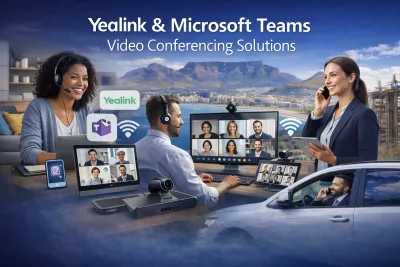
Why Yealink Teams Rooms?
Yealink has been Microsoft's trusted hardware partner since 2015, and was the first company to produce Microsoft Teams-certified desk phones in the world. Their Teams Rooms solutions are purpose-built for Microsoft Teams — not adapted afterthoughts — delivering a native, seamless experience that just works.
NexysCloud supplies, installs, and supports the full Yealink Teams Rooms portfolio, designing the right solution for every room type in your business — from a small huddle space to a large boardroom.
The NexysCloud Video Conferencing Advantage
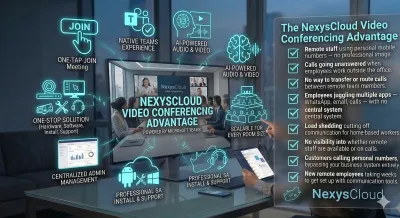
✅ Microsoft Teams Certified — Native Teams experience on every device
✅ One-Touch Join — Join any Teams meeting in a single tap
✅ AI-Powered Audio & Video — Auto-framing, speaker tracking, noise cancellation
✅ One-Stop Solution — Hardware, software, installation, and support from one provider
✅ Scalable — Solutions for every room size from huddle rooms to auditoriums
✅ Easy Management — Centrally managed via Microsoft Teams Admin Center
✅ Local SA Installation & Support — Professional setup with ongoing local support
✅ Flexible Options — Android and Windows-based systems available
Yealink Teams Rooms Solutions by Room Size
🟢 Small Rooms & Huddle Spaces
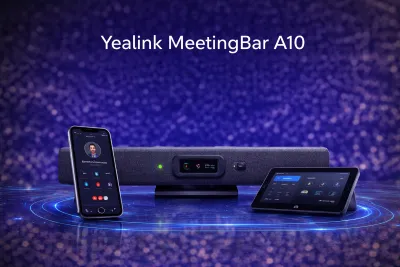
Yealink MeetingBar A10
Perfect for small meeting rooms, phone rooms, and hot-desking spaces
All-in-one Android collaboration videobar
Integrated 4K camera with auto-framing
Built-in microphone and speaker
One-touch Teams meeting join
Supports up to 6 people
Microsoft Teams & Zoom certified
🔵 Medium Rooms
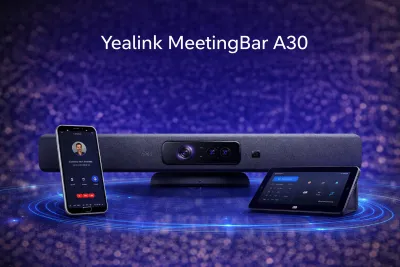
Yealink MeetingBar A30
Ideal for standard meeting rooms of 6–15 people
Dual camera system for wider coverage
AI-powered IntelliFrame — shows both room and individual participants
Extended wireless microphone support
CTP18 tabletop touch controller included
Covers rooms up to 15 people
Android OS — fully Microsoft Teams certified
🟠 Large Rooms & Boardrooms
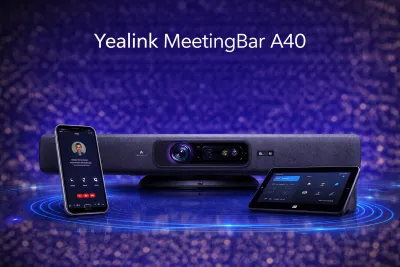
Yealink MeetingBar A40
Step-up option for mid-to-large medium rooms
Enhanced camera and audio system
CTA25 room controller
AI features: speaker tracking, video fence, audio fence
Supports Microsoft Teams Rooms and Zoom Rooms
Starting from ~$2,699 USD (custom ZAR pricing available)
🟣 Training Rooms & Multi-Purpose Spaces
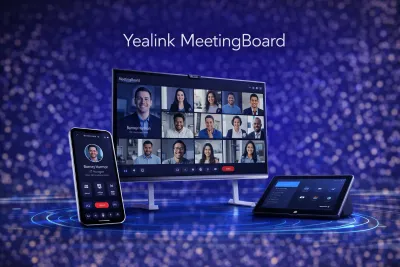
Yealink MeetingBoard
Interactive whiteboard + video conferencing in one device
Large interactive touchscreen display
Built-in camera, microphone, and speaker
Digital whiteboarding and annotation
Perfect for training rooms, classrooms, and collaborative spaces
Native Microsoft Teams experience
Custom pricing available
Key Features Across All Yealink Teams Rooms
🎙️ Audio Excellence
Yealink Optima HD Voice — Studio-quality audio on every call
AI Noise Cancellation — Eliminates background noise automatically
Full Duplex — Natural, interruption-free conversations
SkySound Ceiling Audio System — For large rooms requiring full coverage
Wireless Microphone Extensions — Expand audio coverage in larger spaces
📹 Video Intelligence
AI Auto-Framing — Camera automatically frames active participants
Speaker Tracking — Follows the active speaker in real time
IntelliFocus — Simultaneously shows room view and individual close-ups
Video Fence — Focuses on in-room participants only
4K Resolution — Sharp, professional video quality
🤖 AI-Powered Meeting Experience
Microsoft Copilot Integration — AI meeting summaries, transcripts, and minutes
Automatic Recording Start/Stop — Via Copilot AI
Real-Time Translation — On-the-fly language support
One-Touch Join — Join any Teams meeting with a single tap
Cortana Voice Activation — Hands-free meeting control
📅 Room Management
Yealink RoomPanel — Touchscreen scheduling display outside each room
Real-Time Room Availability — See which rooms are free at a glance
Microsoft Teams Admin Center — Centrally manage all devices
Yealink Management Cloud (YMS) — Monitor and manage all rooms remotely
Room Sensor Integration — Detect occupancy and usage automatically
How It Works
Step 1: Free Meeting Room Assessment
We visit your premises (or assess remotely) to understand your room sizes, team requirements, Microsoft Teams environment, and existing infrastructure — completely free.
Step 2: Custom Solution Design
We recommend the right Yealink Teams Rooms device for each space — matching room size, participant count, and use case to the perfect hardware.
Step 3: Professional Installation
Our certified technicians handle the full installation — mounting, cabling, network configuration, Microsoft Teams integration, and testing. You walk in and it just works.
Step 4: Training & Ongoing Support
We train your team on how to use the system and provide ongoing local SA support — from firmware updates to troubleshooting — managed via Microsoft Teams Admin Center.
Who Is This For?
Business Type
SME with 1–3 meeting rooms
Corporate HQ with boardroom
Multi-branch business
Training & education provider
Hybrid-first organisation
Executive team requiring premium AV
Recommended Solution
MeetingBar A10 / A30 per room
MVC S60 or MVC860
Multi-room deployment package
MeetingBoard + A30
Full Teams Rooms portfolio
MVC860 with SkySound ceiling audio
Frequently Asked Questions
Do we need Microsoft Teams to use Yealink Teams Rooms?
Yes. Yealink Teams Rooms devices are designed for Microsoft Teams and require a Microsoft Teams Rooms license per room. NexysCloud can advise on the right Microsoft 365 licensing for your setup.
Can remote participants join from their laptops?
Absolutely. All Yealink Teams Rooms solutions work seamlessly with Teams on any device — in-room attendees connect via the room system while remote participants join from their laptop, phone, or tablet.
Can the devices work with Zoom as well?
Yes. Many Yealink devices are dual-certified for both Microsoft Teams and Zoom Rooms. We'll confirm compatibility during your assessment.
How long does installation take?
Most single-room installations take half a day. Multi-room deployments are typically completed within 1–3 days depending on the number of rooms and infrastructure requirements.
Can I manage all my rooms centrally?
Yes. All Yealink Teams Rooms devices are managed via the Microsoft Teams Admin Center and/or the Yealink Management Cloud platform — giving you full visibility and control across all rooms from a single dashboard.
What if a device needs servicing or replacement?
NexysCloud provides ongoing local support and warranty management. We handle firmware updates remotely and dispatch technicians for any hardware issues.
Do you supply just the hardware or handle the full setup?
We handle everything — supply, delivery, installation, configuration, Microsoft Teams integration, user training, and ongoing support. One provider, zero hassle.
Ready to Transform Your Business Communications with NexysCloud?
Schedule a free consultation to discuss your communications needs and discover how we can help your business thrive.

Enterprise Power.
Small Business Price.
That's the NexysCloud Difference.


Copyright 2026. NexysCloud. All rights reserved.